


€ 0.00
€ 45.00

Using RDP, VNC, SSH based terminals, S/FTP or web-based interfaces?
No worries, Royal TSX got you covered!
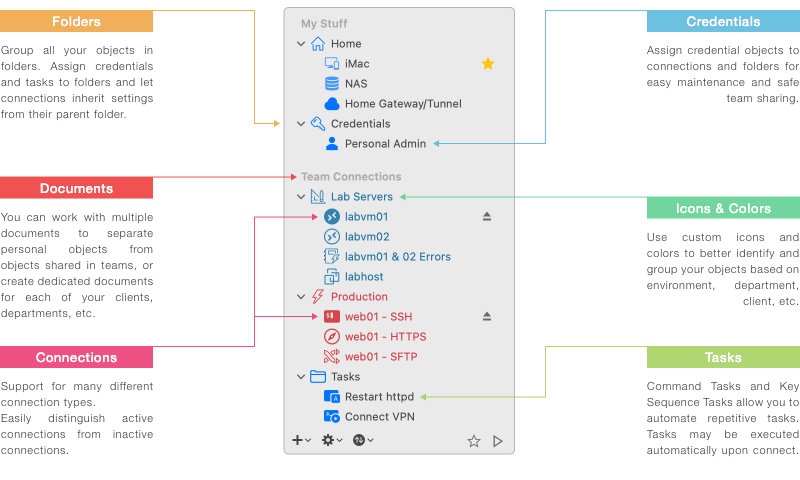
Built-in credential management. Safe team-sharing features.
Share a list of connections, without sharing your personal credentials.
Command Tasks and Key Sequence Tasks make it easy to quickly automate repetitive tasks.
SSH-based tunneling (Secure Gateway) support is tightly integrated in Royal TSX.
Dynamic Folders allow you to dynamically import data from external sources.

RDP based on FreeRDP with Gateway support

SSH and Telnet based on iTerm2

VNC and Apple Remote Desktop support

Based on Safari
(WebKit)

Transfer files using FTP, SFTP and SCP

Connect to and manage TeamViewer sessions

Currently only available on Windows

Currently only available on Windows

Manage and connect to VMware instances

Manage and connect to Hyper-V instances

Analyze (slice and dice) Windows Events

Start, stop and restart Windows Services

Monitor and manage running processes

Manage terminal service sessions

Execute scripts and display the results

 Credential Management
Assign, reuse and link credential objects to connections and folders.
Connections can inherit credentials from the parent folder.
Access credentials from other documents and external sources.
 Protected through Encryption
Sensitive data in your document is encrypted and can also be password protected. Lock down shared documents and keep passwords confidential.
 Sharing Connections Securely
The ability to assign credentials to connections by name allows you to share the document containing the connections without compromising your credentials.

 Automate repetitive Tasks
Streamline your workflow with Tasks. Use replacement tokens to access connection properties or credential information. Execute tasks in context of one or more connections.
 Command Tasks
Create your own tasks to open and close VPN connections automatically. Common and useful tasks, like ping and traceroute are built-in and can be executed as needed.
 Key Sequence Tasks
Key sequence tasks are used to invoke keyboard input in one or more connections. Automate long, complex and repetitive tasks and execute them in one or more active connections.
 SSH-based Tunnels
The Secure Gateway implementation is based on SSH tunnels (port forwarding) which is an industry standard for secure communication between systems.
 Tightly integrated
No hacky approach using external applications! Tunneling support in Royal TSX is tightly integrated. Supported connection types are Remote Desktop, VNC, SSH and Telnet.
 Included in Royal Server
A Secure Gateway component is included in Royal Server. Installation and configuration is done within minutes. Royal Server also offers centralised logging for tunneled connections.

 Dynamic Folders
Dynamic Folders allow you to dynamically import data from external sources into Royal TSX. Dynamic Folder scripts can be executed manually or automatically when a document is loaded.
 Dynamic Credentials
Dynamic Credentials allow you to provide only metadata (Name, etc.) when creating the object and dynamically retrieve properties like passwords when a connection referencing the credential is opened.
 RoyalJSON
RoyalJSON is a unidirectional, human-read-and-writable data format for importing data from external sources. It's easy to write and a powerful way to get data stored outside of Royal TSX into the app.
You can assign a credential to connections by specifying the name of the credential. This allows you to share a document containing only connections while your personal credential is stored in a private document, protected by your password.
Royal TSX can handle documents opened by multiple users at the same time and allows you to synchronize document changes without the need for a SQL database back-end! Simply use a network share or cloud storage service (such as Dropbox).
Royal TSX tightly integrates with 1Password, LastPass and KeePass.
Documents created using these password management systems can be opened and the contained credentials can be used just like regular Royal TSX credentials.
Royal TSX documents are fully interchangeable and compatible with Royal TS (for Windows), Royal TSX (for macOS), Royal TSi (for iOS) and Royal TSD (for Android).

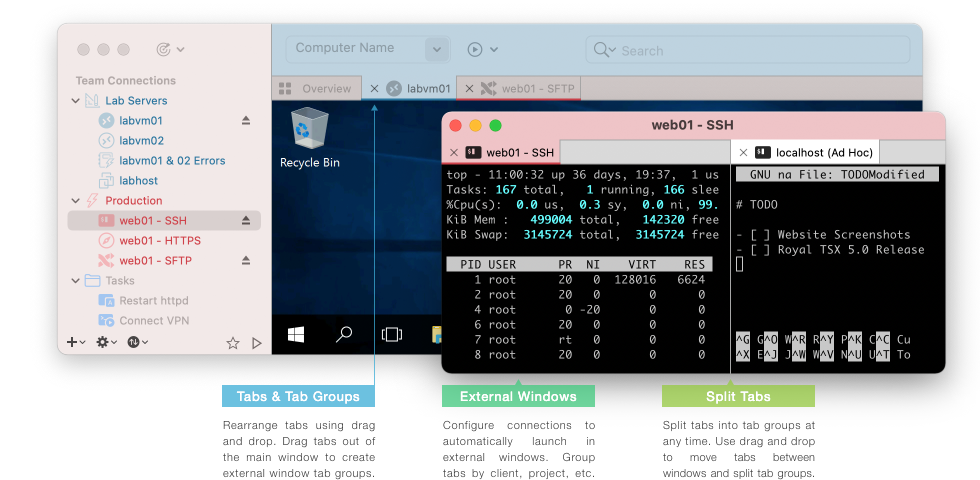
With a clean, yet customizable user interface, Royal TSX lets you work your way.
The navigation panel can be set to auto hide when available screen space is at a premium.
Connection tabs can have custom colors and icons assigned to them. Any toolbar item can be placed wherever it makes the most sense for you. Naturally, we also support macOS' dark mode.
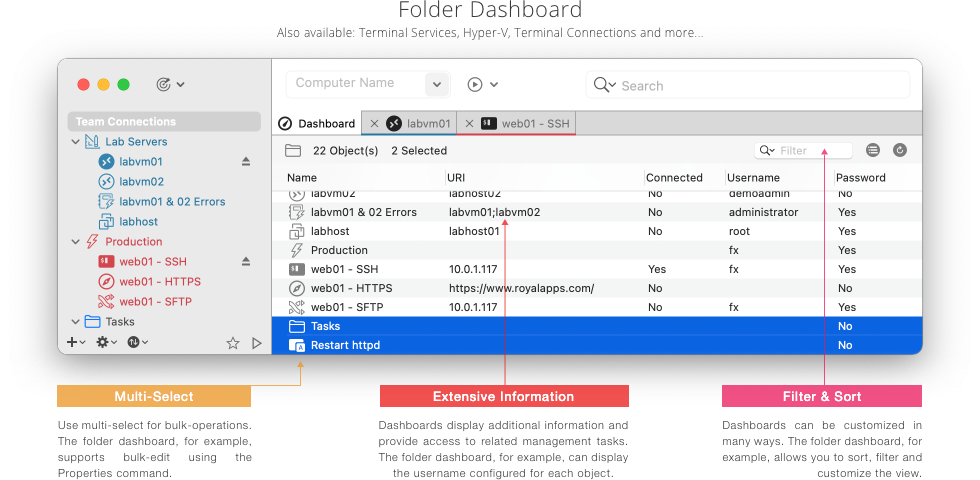
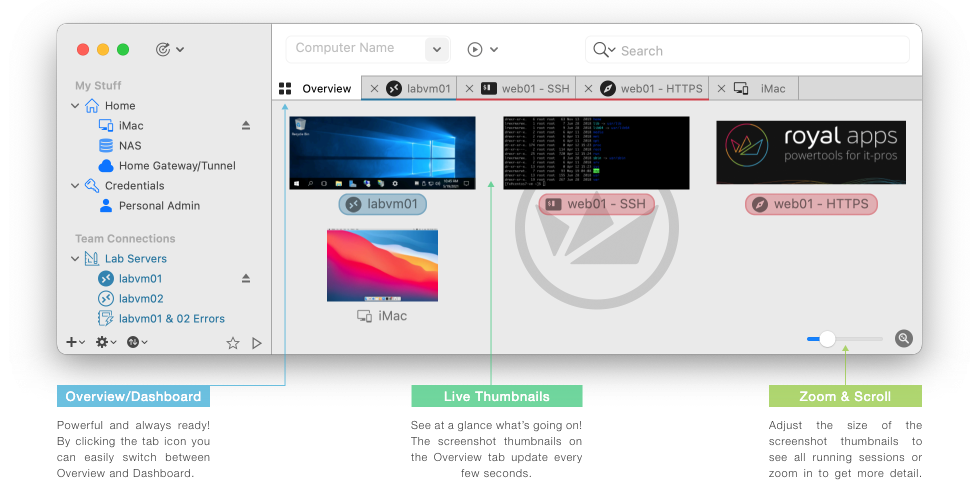
Our dashboards provide quick access to additional management features or connection data.
The overview lets you see at a glance what's going on inside your active sessions.

Royal Server is a Secure Gateway for remote connections and provides common remote management tasks for our Royal TS/X cross-platform clients on Windows, macOS, iOS and Android.
Royal Server can also host your Royal TS/X documents to provide additional security and convenience for your team.
I can't appreciate Royal TSX enough. Since finding this miraculous piece of software, I didn't have to look back to any other client. The time, effort and love you guys put in the development is worthy of a standing ovation.
As long as I'm in the system administration career, and you guys are around, it would be impossible to use anything else cause Royal TSX is ADDICTIVE.
Abir Ahmed, System Administrator, Red Hat Certified Architect
New Directions In Computing, Los Angeles, USA
Every day I use Royal TSX at my job and every day one of my coworkers (we work in IT) passes by my desk and asks me what software I’m using and I always rave about it.
I’ve tried many apps like this in the past and this application always impresses me. I can’t get my work done without it at this point and I also appreciate the incredibly fast response time by your support.
I look forward to future versions and I thank you for a great product!
Allan Mohr, Network Engineer
Pet360, Pennsylvania, USA
There are many RDP clients on the market, but when it comes to managing a lot of remote servers, very few can compete with Royal TS.
Multi-session, multi-protocol, multi-platform, nice tabbed interface, extensively customizable, excellent credentials management, there is nothing bad to say about it.
With its very affordable price and its strong user community you really can't go wrong.
Gregory Journe, Software Developer
Nurgo-Software, France
I found Royal TS several years ago to help me manage dozens of Windows servers and it was really good at this. Now I also use it to manage hundreds of Unix systems, work with web admin interfaces and even proprietary systems software, and all of this with an awesome centralized credentials management.
Royal TS has become the new Swiss Army knife for IT individuals and teams: everything you need at your fingertips in a single tool with built-in simple but really powerful sharing capabilities!
I have not found a product as close to its users which evolves with their real needs, all for such an attractive price!
Nicolas Grimler, Software Integrator
Lyon, France





























Safely and securely protect your documents and credentials.

A slick, handy way to improve your workflow.

Quickly connect to your systems.
Easily create ad hoc connections.

Save time! AppleScript support lets you automate repetitive tasks.

Bulk-Add and Bulk-Edit help you keep your documents clean.

Highly customizable, including personalized overrides.


